
Hoopla Digital offers a variety of features to enhance your reading, watching, and listening experience. One of the standout features is the ability to download content for offline access. Simply click or tap “Download to your device” on the title details page beneath the play or resume button. You can then access and play the downloaded title from the “My Hoopla” section.
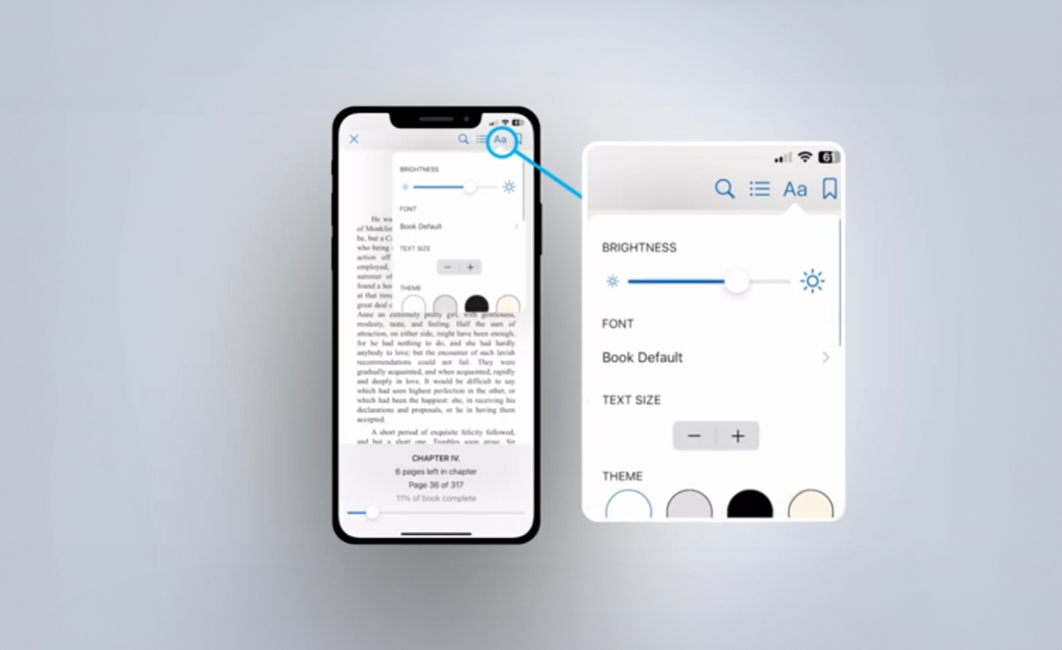
For eBooks, Hoopla provides several display options to customize your reading experience. You can adjust brightness, text size, and font styles, including a dyslexic mode. If you’re using the website, click the three lines in the upper left corner and then click “Settings.” On the app, tap the font icon in the upper right corner to access these options.
When listening to audiobooks, you can set a sleep timer by clicking or tapping the sleep icon at the bottom of the audiobook player. This is perfect for those who like to fall asleep to their favorite stories. Additionally, you can adjust the playback speed of the audiobook by selecting the speed icon, allowing you to listen at a pace that suits you.
These are just some of the features that make Hoopla Digital a versatile and user-friendly platform, ensuring you have a personalized and enjoyable experience with your favorite media.


Endless entertainment.
No subscription required.
With Hoopla you can read, listen, and watch for free with your library card.
Get Started