
Did you know you can download movies without paying a dime or waiting for a hold to come in? Hoopla makes it simple. All you need is a library card, the free Hoopla app, and a few minutes to grab your next favorite film. Once it’s downloaded, that movie is yours to watch on a plane, a road trip, or anywhere your signal drops out.
New to Hoopla or just haven’t tried the download feature yet? This guide walks you through the whole process and shows you how Hoopla stacks up against other library streaming apps.
Getting started takes just a few steps:
That’s It! That’s the whole process. Because Hoopla licenses its catalog directly from studios and content providers, every download is completely legal, and your device stays safe from the malware that often comes bundled with pirated files.
*Libraries typically set a monthly borrowing limit, so check your library’s Hoopla page to see how many free movies you can download each month.
Hoopla and Kanopy are the two most common free movie apps offered through public libraries, but they work differently. The standout difference is that Hoopla supports offline downloads and instant borrowing with no wait lists, while Kanopy streams only and often caps how many titles you can watch each month.
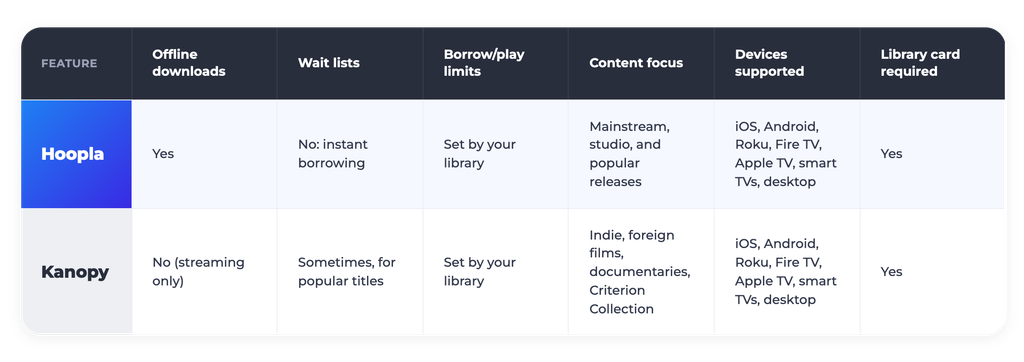
If offline viewing during travel or spotty signal matters to you, Hoopla is built for that. If you want to watch a movie now, Hoopla is built for that too, because there are no wait lists.
*Borrow and play limits vary by library, so check your library’s specific policy for your monthly allowance.
Download the Hoopla app today, sign in with your library card, and build an offline movie queue.
Additional Resources:
Free Movie Downloads with Hoopla Made Easy
Streaming Devices for Library Movies on Hoopla
What Trending Movies Are on Hoopla?
*Titles may vary by library.