

Looking for great movies to stream without breaking the bank or signing up for a streaming service? Look no further than Hoopla. Hoopla has award-winning dramas, kid-friendly cartoons, binge-worthy TV series, documentaries, hit movies, and more. This digital service lets you watch free movies and TV shows with your library card—no ads, no fees, and no waiting lists.
In this guide, we’ll walk you through everything you need to start watching today—from creating your account to linking your favorite devices.
What Is Hoopla and Why Use It?

Hoopla is a free TV streaming app and digital platform that partners with public libraries to offer instant access to movies, TV shows, audiobooks, graphic novels, eBooks, and music. All you need is a library card from a participating library.
Why Hoopla?
- Stream instantly—no holds or waitlists
- Ad-free viewing
- Download titles to watch offline
- Available on smartphones, tablets, smart TVs, and more
- New titles added regularly
Getting Started: How to Create and Link Your Hoopla Account

Before you can enjoy streaming movies free, you’ll need to set up and validate your Hoopla account.
Step 1: Sign Up for Hoopla
- Visit https://www.hoopladigital.com
- Click Get Started Today
- Enter your email, create a password, and select your local library
- Enter your library card number
- Accept the terms and click Sign Up Now
How to Validate Your Hoopla Account on a Streaming Device

After installing the Hoopla app on your streaming device (Roku, Fire TV, Apple TV, Android TV), you’ll be asked to validate your account.
To validate via website:
- Open Hoopla on your TV or streaming device
- You’ll see instructions and a 4-digit code
- On a separate device, go to hoopladigital.com/link
- Log into your Hoopla account (or create one first if you haven’t)
- Enter the 4-digit code
- Your device will now sync with your account and display your borrowed content and available borrows for the month
How to Validate Your Hoopla Account Using the Hoopla App
Prefer to use your smartphone or tablet?
You can also link devices directly from the Hoopla app:
- Open the Hoopla app
- Tap My Hoopla
- Tap the gear icon (top left corner)
- Select Link a Streaming Device
- Enter the 4-digit code and tap Proceed
- Your streaming device will now be connected
How to Install the Hoopla App on Your TV
Android TV
- From your Android TV home screen, go to the Play Store
- Search for Hoopla
- Select the app and install
- Follow the validation steps above
Apple TV
- Navigate to the App Store from your Apple TV home screen
- Search for Hoopla
- Install the app
- Validate your account
Fire TV
- Visit the Amazon App Store on your computer or phone
- Search for Hoopla
- Select your Fire TV device and click Deliver
- Look for the app in “Your Apps and Games”
- Move it to your main menu for easy access
- Validate your account
Roku
- From your Roku home screen, go to Streaming Channels
- Select Search Channels and type in “Hoopla”
- Add the channel
- Open it and validate your account
What Can You Watch on Hoopla?
Hoopla has an impressive collection of shows to watch, from beloved classics to current favorites. Here are a few suggestions to get you started:
Movies:

Directed by Matt Winn
A financially struggling couple sells their London home, but their farewell dinner party spirals into chaos when an uninvited guest ignites secrets and darkly comic revelations.
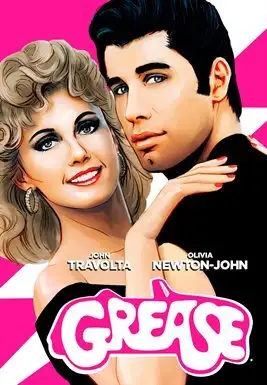
Directed by Randal Kleiser
Grease is the one that you want! Return to high school with sweet Sandy (Olivia Newton-John), cool T-Bird Danny (John Travolta), and a rockin’ all-star cast.

Directed by James Hawes
Based on the true story of Nicholas Winton (Anthony Hopkins), who heroically rescued hundreds of Jewish children from the Nazis just before World War II.
TV Shows:

Sherlock Season 1
Sherlock Holmes (Rupert Graves) and Doctor Watson’s (Martin Freeman) adventures arrive in 21st Century London.
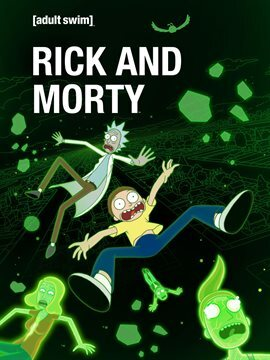
Rick and Morty Season 6
A brilliant, hard-drinking inventor, Rick, and his not-so-brilliant, straight-laced grandson, Morty, embark on wild adventures through life, space, and time travel.
Plus, enjoy seasonal collections, curated staff picks, and trending titles on Hoopla, always free.
Final Tips for a Seamless Streaming Experience
- Download for offline viewing: Perfect for travel or when Wi-Fi is limited
- Use on multiple devices: Stream on your phone during a commute and switch to your smart TV at home
Ready to Start Streaming?
Visit the Hoopla homepage to explore top movies to stream now and take full advantage of your library membership. When you’re deciding what to watch next or want to watch movies free with your family, Hoopla has you covered.
*Title availability may vary.


Endless entertainment.
No subscription required.
With Hoopla you can read, listen, and watch for free with your library card.
Get Started